
How to use it
- 1Enter your business name, address, GSTIN and state. These are saved on your device, so you type them only once.
- 2Add the customer's name, address and state. If the customer is registered under GST, add their GSTIN too.
- 3List each item with its HSN or SAC code, quantity, rate and GST %. The tax and totals update as you type.
- 4Check the live preview, press Download PDF / Print, and choose Save as PDF in the window that opens.
- 5Want to keep editing it yourself? Press Excel (.xlsx) for a sheet with working formulas, or Word (.docx). Both are made on your device, like the PDF.
GST Invoice – a filled-in sample
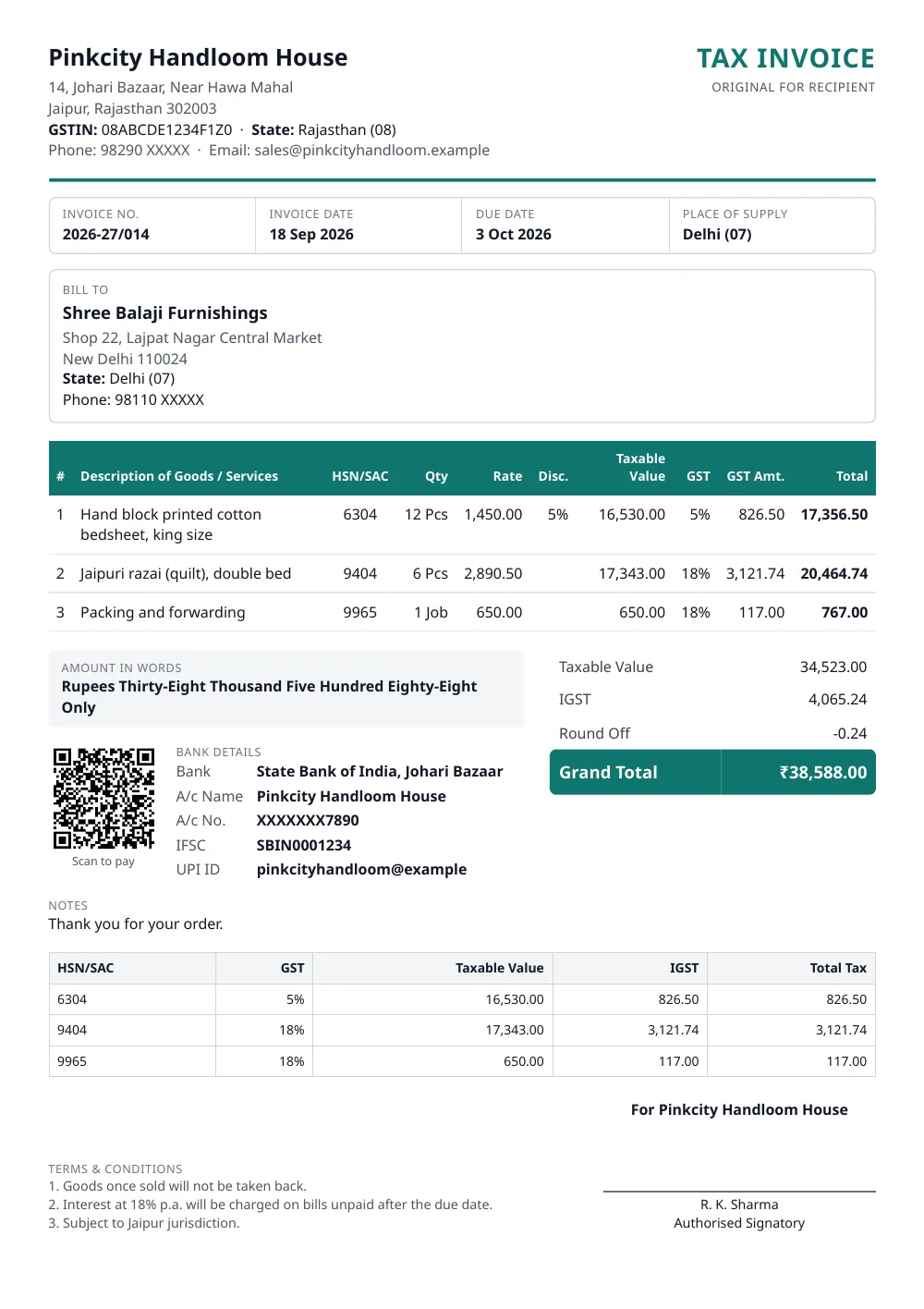
Made with the tool above from made-up details: every name and number in it is invented. Press “See a filled-in example” in the tool to open it there and download it.
What a GST tax invoice must contain
Rule 46 of the CGST Rules lists the particulars of a tax invoice. This format has a place for each of them:
- Name, address and GSTIN of the supplier
- A consecutive serial number of up to 16 characters, unique for the financial year
- Date of issue
- Name, address and GSTIN of the customer, if the customer is registered
- HSN code for goods or SAC for services
- Description, quantity and unit
- Total value, and taxable value after any discount
- Rate and amount of tax, shown separately as CGST, SGST or UTGST, or IGST
- Place of supply with the state name, when the supply is to another state
- Delivery address, when it is different from the place of supply
- Whether tax is payable on reverse charge
- Signature of the supplier or an authorised person
When the customer is not registered and the taxable value is ₹50,000 or more, the invoice must also carry the customer’s name, address, delivery address and state.
CGST and SGST, or IGST?
It depends on two states: yours, and the place of supply.
| Your state and place of supply | Tax printed on the bill |
|---|---|
| The same state | CGST + SGST, each half of the GST rate |
| The same union territory without a legislature (Chandigarh, Ladakh, Lakshadweep, Andaman & Nicobar, Dadra & Nagar Haveli and Daman & Diu) | CGST + UTGST |
| Different states | IGST at the full rate |
The tool picks the right one from the states you choose. Place of supply is taken to be the customer’s state unless you set it separately.
Which GST rate applies?
The rate depends on the HSN or SAC code of what you sell. GST rates were revised in September 2025, so confirm the current rate for your code on the CBIC GST rate finder before you bill. The GST % box accepts any rate, including 0.
How many digits of HSN code?
- Turnover up to ₹5 crore in the previous financial year: 4 digits. This is required on invoices to registered customers and optional on invoices to consumers.
- Turnover above ₹5 crore: 6 digits on every invoice.
Tax invoice, bill of supply or simple bill?
- Tax invoice: a registered business making a taxable sale.
- Bill of supply: a composition dealer, or a registered business selling exempt goods or services. No tax is shown. A composition dealer also writes “composition taxable person, not eligible to collect tax on supplies” at the top.
- Simple bill: a business that is not registered under GST.
When must the invoice be issued?
For goods, at or before the time the goods are removed or delivered. For services, within 30 days of providing the service.
This is not an e-invoice
Businesses whose turnover has crossed ₹5 crore in any year since 2017-18 must report their B2B invoices to the government’s Invoice Registration Portal and print the IRN and QR it returns. This tool makes ordinary invoices. If e-invoicing applies to you, use your accounting software or the portal for B2B bills.
Questions people ask
Is this GST invoice maker really free?
Yes. There is no sign-up, no watermark and no limit on the number of invoices. The site is paid for by advertising.
Can I download this invoice format in Excel?
Yes. Press Excel (.xlsx) above the preview. You get a real spreadsheet with your details filled in and working formulas: the line amounts, GST, round-off, grand total and the amount in words recalculate when you change a figure. There are no macros, so there is no security warning to click through. It is a standard .xlsx file, the format used by Excel, Google Sheets, WPS Office and LibreOffice. Press it with an empty form to get a blank invoice template in Excel.
Can I download this invoice format in Word?
Yes. Press Word (.docx) above the preview. The file is laid out like the PDF, and every word and figure in it can be edited. It is a standard .docx file, the format used by Microsoft Word, Google Docs, WPS Office and LibreOffice. Press it with an empty form and you get a blank invoice format in Word, with every heading in place and room to type. Totals in the Word file are plain text, so use the Excel file if you want them to recalculate.
Where are my business and customer details stored?
Only in your own browser, on your device. They are never sent to our server, so we cannot see them. Clearing your browser data removes them.
Can I make a bill if I do not have a GSTIN?
Yes. Choose 'Simple bill without GST' under Type of bill. A business that is not registered under GST cannot charge GST, so no tax columns are printed.
How do I save the invoice as a PDF on my phone?
Tap Download PDF / Print. On the print screen, open the printer list and choose Save as PDF, then tap the PDF button. On a computer, choose Save as PDF as the destination.
Can I print the invoice in Hindi?
Yes. Switch Document language to हिंदी above the preview. The headings and the amount in words change to Hindi. Whatever you typed stays exactly as you typed it.
What invoice number should I start with?
Any series you like, such as INV-001 or 2026-27/001. Under the GST rules it must run consecutively, be unique within the financial year and be no longer than 16 characters.
Will the QR code work with every UPI app?
Yes. It is a standard UPI QR containing your UPI ID, the bill amount and the invoice number, so it opens in PhonePe, Google Pay, Paytm, BHIM and bank apps. Check your UPI ID carefully, because the money goes to that ID.
Last reviewed: 19 September 2026