
How to use it
- 1Enter the name, add a photo if you wish, and pick a colour and a design. The line at the top is optional and can be anything your family prefers.
- 2Fill in the personal details. Skip anything you do not want to share: rows left empty are not printed.
- 3Open Education and career, Family details and Contact details and fill those in.
- 4Add a few lines about yourself and your partner preferences, check the preview and press Download PDF / Print.
- 5Want to change the wording yourself? Press Word (.docx) for an editable file. It is made on your device, like the PDF.
Marriage Biodata – a filled-in sample
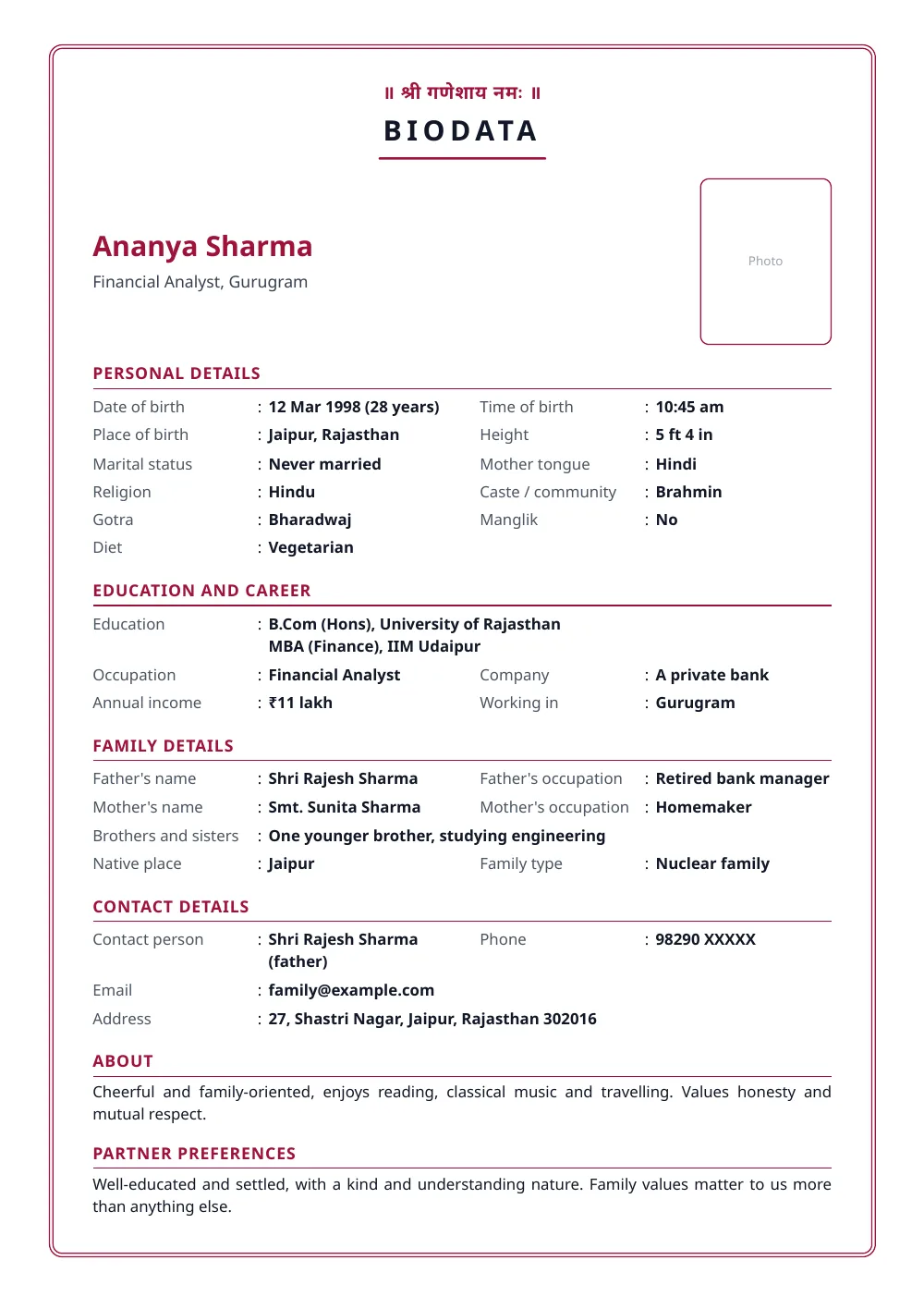
Made with the tool above from made-up details: every name and number in it is invented. Press “See a filled-in example” in the tool to open it there and download it.
What to put in, and what to leave out
Always: full name, date of birth, height, education, occupation, city, parents’ names and what they do, brothers and sisters, a contact number.
If it matters to the families involved: time and place of birth, gotra, rashi or nakshatra, manglik status, community, mother tongue, diet.
Think twice: your full home address and your own mobile number. Many families give a parent’s number as the contact and only the city, and share the address after the first conversation.
Be accurate
A biodata is the first thing two families exchange. Age, education, job and income are all easy to check, and a marriage that starts with a wrong fact starts badly. Write what is true, and write it plainly.
A few lines about yourself
Two or three honest sentences work better than a list of adjectives: what you do, what you enjoy, what kind of home you hope to build. Under partner preferences, say what genuinely matters to you and leave out what does not.
Keep your biodata private
Send it only to families and matchmakers you trust. Once a PDF is forwarded, you cannot call it back. If you use matrimonial websites or WhatsApp groups, consider a version without your exact address and with a parent’s phone number.
Questions people ask
Is my photo uploaded anywhere?
No. The photo is resized inside your browser and placed straight into your PDF. It is never sent to our server, and nobody else can see your biodata unless you share it.
Can I download this biodata format in Word?
Yes. Press Word (.docx) above the preview. The file is laid out like the PDF, and every word and figure in it can be edited. It is a standard .docx file, the format used by Microsoft Word, Google Docs, WPS Office and LibreOffice. Press it with an empty form and you get a blank biodata format in Word, with every heading in place and room to type.
What should a marriage biodata include?
Name, date of birth, height, education, occupation and place of work, the family's details, and a contact person and number. Everything else, such as time and place of birth, gotra, rashi or income, is optional. Include what the families you are writing to usually ask for.
Should it be one page?
Yes, if you can. Families look at many biodatas, and one clear page with a good photo is read more carefully than three pages. This layout fits a full biodata on one page.
Which designs can I choose from?
Four. Classic has a double-line frame with rounded corners. Traditional has a heavier frame with floral corners and the title on a ribbon. Modern has no frame and puts the name and photo in a band of your colour. Simple has no frame and no colour blocks, only thin lines. Each works with any colour, in English or Hindi, and fits a full biodata on one page. In the Word file, Classic and Traditional keep a double-line page border and Modern and Simple have none; the colour band and the floral corners are in the PDF only.
Can I make the biodata in Hindi?
Yes. Switch Document language to हिंदी above the preview. The headings change to Hindi, and you can type the details in Hindi too.
Which photo works best?
A recent, well-lit photo in which your face is clearly visible, in simple or traditional clothes, without sunglasses and without other people in the frame. A plain background is best.
How do I share it on WhatsApp?
Download the PDF and send it as a document. A PDF stays sharp when it is zoomed and printed, which a photo of a printed page does not.
Is there a blank biodata format?
Yes. Press 'Blank format' to print the same layout with empty rows to fill by hand.
Last reviewed: 14 October 2026