
How to use it
- 1Enter your business details once. They are saved on your device and reused in every format on this site.
- 2Fill in the receipt number, the date and the name of the person or business that paid you.
- 3Enter the amount, how it was paid and the UPI, transaction or cheque number, and what the payment is for.
- 4Check the preview and press Download PDF / Print. Sign both copies, hand over the customer copy and file the other.
- 5Want to keep reusing it yourself? Press Excel (.xlsx) for a sheet whose amount in words follows the amount, or Word (.docx) to change the wording. Both are made on your device, like the PDF.
Payment Receipt – a filled-in sample
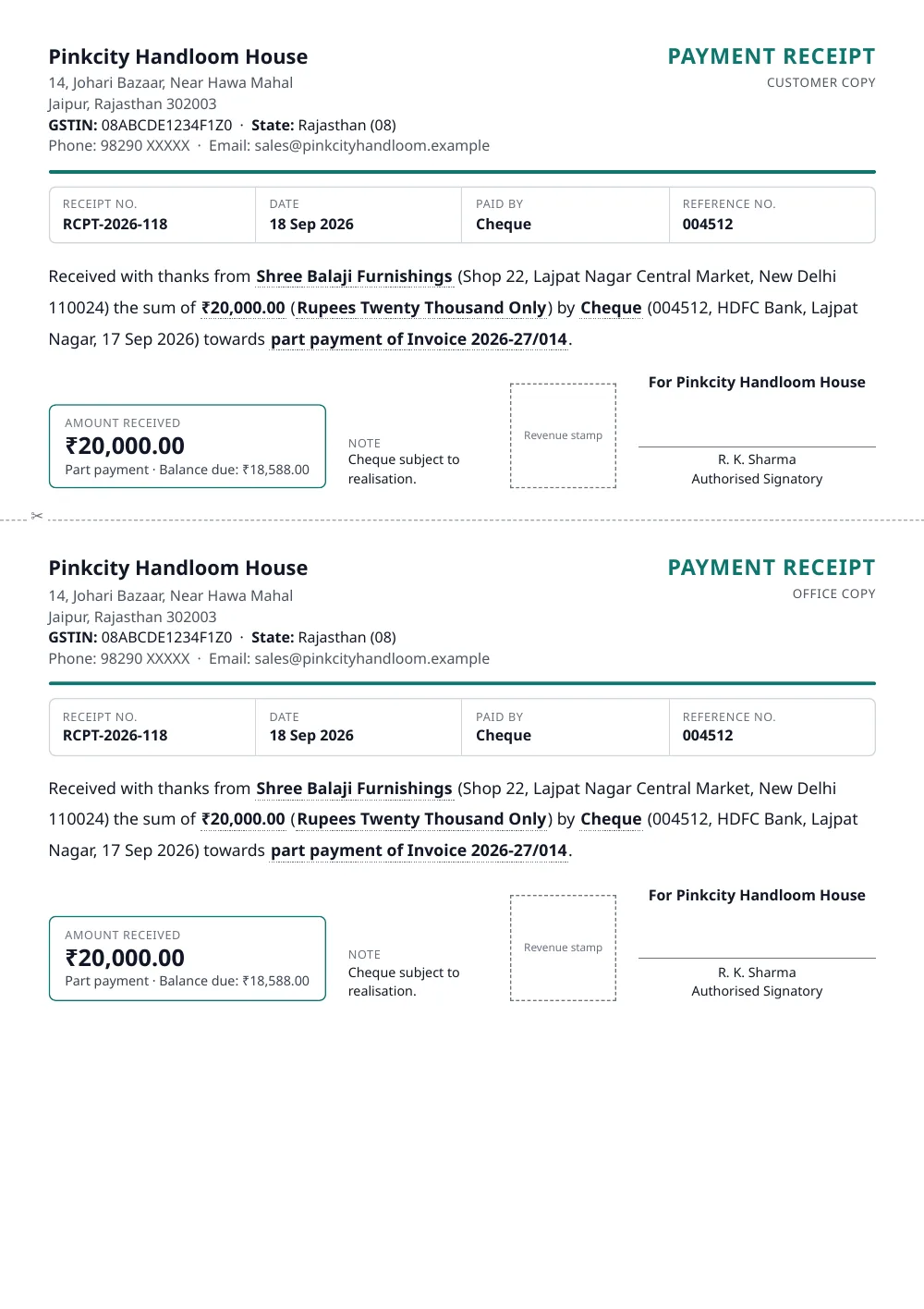
Made with the tool above from made-up details: every name and number in it is invented. Press “See a filled-in example” in the tool to open it there and download it.
What a proper receipt shows
- A receipt number and the date, so that both sides can find it again
- Who paid: the name, and the address if you know it
- The amount in figures and in words. Words are much harder to alter than digits
- How it was paid, with the UPI reference, transaction number or cheque details
- What it was for: the invoice number, the order, or the month of the fee or rent
- Whether it is the full payment, a part payment or an advance, and the balance still due
- Your business name, address and signature
Keep the second copy
Receipts are your record too. When a customer claims to have paid, or the income-tax or GST department asks how a deposit arose, the office copy with its number and date is your answer. Number receipts in one continuous series and do not reuse a number.
Advances if you are registered under GST
When a GST-registered business takes an advance for a service, GST is generally payable at that time and the rules expect a receipt voucher that also shows the tax. This format records the payment itself. Ask your accountant whether you also need a GST receipt voucher for your advances.
Questions people ask
What is the difference between an invoice and a payment receipt?
An invoice asks for payment and is issued when you sell. A receipt confirms that payment has actually been received. A customer who pays an invoice later should get a receipt that mentions the invoice number.
Can I download this payment receipt format in Excel?
Yes. Press Excel (.xlsx) above the preview. You get the receipt as a sheet you can keep reusing: type the next amount over the old one and the amount in words follows it. With two copies on the page, the office copy's amount is a formula that follows the customer copy's, so the two halves can never disagree. There are no macros, so there is no security warning to click through. It is a standard .xlsx file, the format used by Excel, Google Sheets, WPS Office and LibreOffice. Press it with an empty form to get a blank payment receipt template in Excel.
Can I download this payment receipt format in Word?
Yes. Press Word (.docx) above the preview. The file is laid out like the PDF, and every word and figure in it can be edited. It is a standard .docx file, the format used by Microsoft Word, Google Docs, WPS Office and LibreOffice. Press it with an empty form and you get a blank payment receipt format in Word, with every heading in place and room to type.
Do I need a revenue stamp on the receipt?
A ₹1 revenue stamp is customarily affixed, and signed across, on receipts for more than ₹5,000 paid in cash, under the Indian Stamp Act. Tick 'Leave a box for a revenue stamp' to print a space for it. Payments received through a bank are generally not stamped. If you are unsure, ask your accountant.
Is there a limit on how much cash I can accept?
Yes. Income-tax law restricts receiving ₹2 lakh or more in cash from one person in a day, for a single transaction, or for one event, and the penalty can equal the amount received. The tool shows a reminder when a cash amount reaches that level.
What should I write for a part payment or an advance?
Choose 'Part payment' or 'Advance' under 'This payment is' and enter the balance still due. Both are printed next to the amount, so there is no confusion later about what remains.
What should I note when I am paid by cheque?
Enter the cheque number, the bank and branch, and the cheque date; they are printed on the receipt. Many businesses also add the note 'Cheque subject to realisation', because the payment is complete only when the cheque clears.
Can I print a blank receipt book page?
Yes. Press 'Blank format' to print two empty receipts with dotted lines to fill by hand, with your own details left out so you can use a rubber stamp.
Can the receipt be in Hindi?
Yes. Switch Document language to हिंदी above the preview. The wording and the amount in words change to Hindi.
Last reviewed: 19 September 2026